What Your AGENTS.md Should Say About Your Design System
We checked 30 design system repos for AGENTS.md and other agent files. 16 have one, none is for teams using the system. Here is the section to copy.
 Nezar MansourContent Writer
"Design tokens are the styling contract." That line is in the AGENTS.md file of Workday's Canvas Kit, and it's the best sentence about design systems we found in any agent instruction file this month. It tells a coding agent that colours and spacing come from @workday/canvas-tokens-web, not from whatever value looks right.
It has one limit. It only reaches agents working inside the Canvas Kit repository. The engineers building Workday products with Canvas Kit, and the agents they use, never open that file.
That's the pattern across the 30 public design system repositories we checked on 16 November 2026. This post shows the count, then gives you the design-system section to put in your own product's AGENTS.md, so your agent gets the same instruction.
What is AGENTS.md?
AGENTS.md is a markdown file at the root of a repository that tells AI coding agents how to work in it. The agents.md project describes it as "a simple, open format for guiding coding agents," says it is used by over 60,000 open-source projects, and lists more than 20 tools that read it, including Cursor, GitHub Copilot's coding agent, OpenAI Codex and Gemini CLI. It is now stewarded by the Agentic AI Foundation under the Linux Foundation.
When a repo has several, the closest AGENTS.md to the file being edited wins. Claude Code reads a similar file, CLAUDE.md, which we cover in what to put in CLAUDE.md for a design system.
GitHub's analysis of over 2,500 agents.md files recommends six areas: commands, testing, project structure, code style, git workflow and boundaries. It doesn't mention design systems, design tokens or UI components.
What 30 design system repos put in their agent files
We took the 31 systems from our AI-ready design systems study and checked each one's main public repository for agent instruction files: AGENTS.md, CLAUDE.md, Cursor rules and Copilot instructions. One system has no public repo, which leaves 30. Then we read every file we found.
| Agent instruction files, 30 design system repos (16 Nov 2026) | Repos |
|---|---|
| Any agent instruction file at the repo root | 16 |
AGENTS.md | 12 |
| Copilot instructions | 9 |
CLAUDE.md | 6 |
| Cursor rules | 3 |
| Of the 16 with a file: | |
| Mentions design tokens (where they live or how to use them) | 10 |
| Tells the agent to use tokens instead of hard-coded values | 5 |
| Links the system's public documentation site | 5 |
| Written for teams that use the system in their own products | 0 |
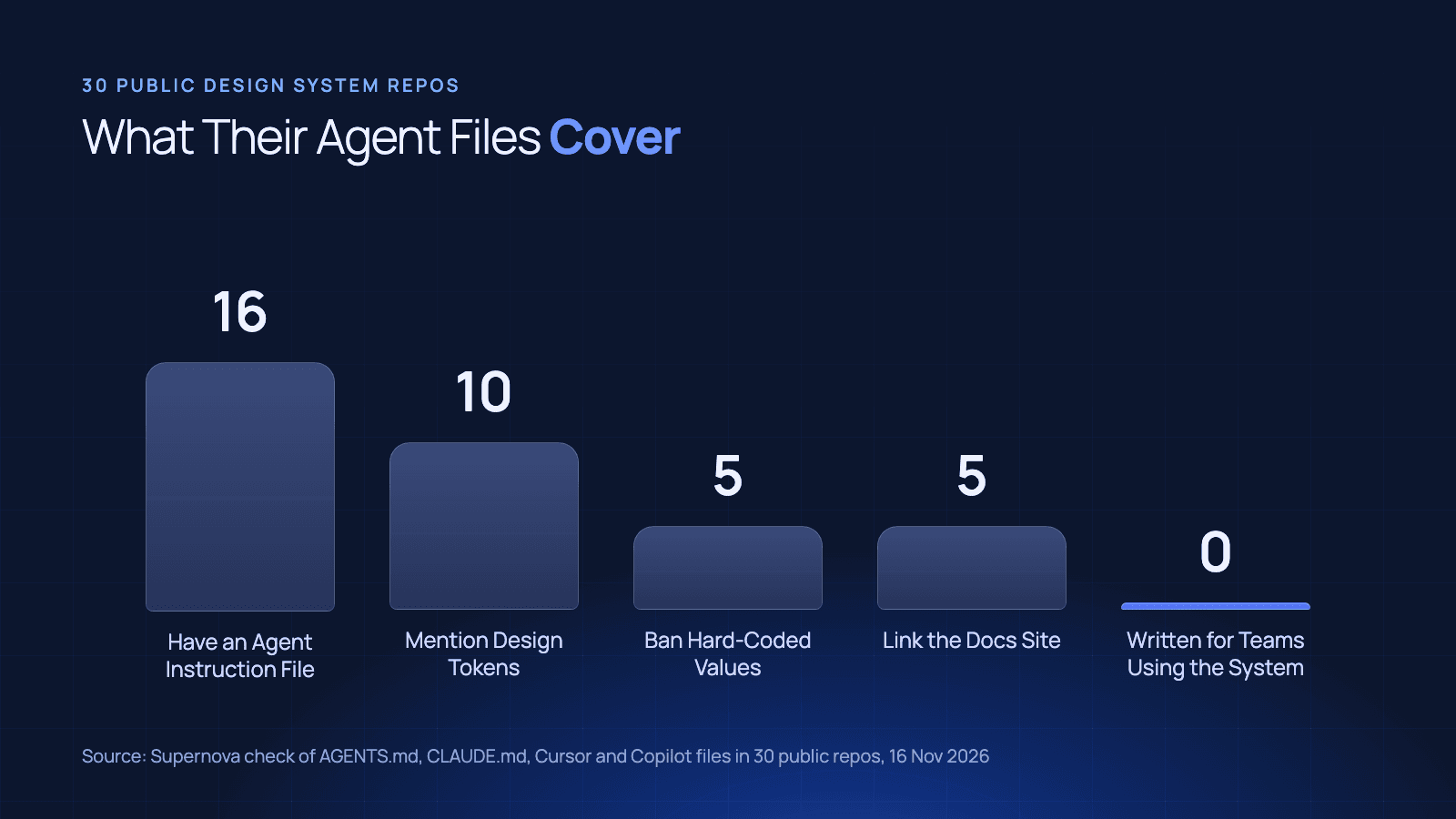
The good news is in the middle rows. Ten of the 16 files talk about tokens, and five give the agent the rule that matters most: no hard-coded values. Sage's Carbon puts it in one line: "Prefer Sage tokens over hard-coded visual values." Skyscanner's Backpack tells the agent to import tokens from its own tokens package.
The bottom row is the problem. Every one of the 16 files is written for people contributing to the design system: how to install, how to run the tests, how to write a changeset. That matches what we found in October, when 12 of the 31 systems had an AGENTS.md and all 12 were for contributors.
A few systems do ship agent guidance inside their npm packages for consuming teams, which a repo check doesn't count. We cover that approach in how to make your design system AI-ready.
The design-system section to copy
If you build a product on a design system, your agent needs the instruction in your repo, not in the design system's. Here is a section for your product's AGENTS.md, built from what the best of the 16 files do. Replace the package names and paths with yours.
## Design system

We build UI with the Acme design system. Follow these rules for any UI change.

### Components
- Import components from `@acme/react`. Never build a button, input, modal,
  select or table from scratch.
- Props and allowed values come from the package's TypeScript types. Don't
  invent props. If a prop isn't in the types, it doesn't exist.
- Deprecated components and props are listed in `@acme/react/DEPRECATIONS.md`.
  Don't use them in new code.

### Tokens
- Every colour, spacing, radius, font size and shadow comes from
  `@acme/tokens`. No hex, rgb or px values in component code.
- Use semantic tokens (`color.text.danger`), not palette tokens (`color.red.600`).
- Tokens are the styling contract. If no token fits, stop and ask.

### When something is missing
- If no component fits, don't build one. Say which component you'd need.
- Before guessing a token or prop, look it up in the design system's MCP server
  (`acme-ds`), which is current. This file is not.
Four things in that section come straight from the repo files above. "Styling contract" is Canvas Kit's phrase. The ban on hard-coded values is in five of them. Pointing the agent at the tokens package is Backpack's habit. Naming a source to look things up comes from the five files that link their documentation site.
Three things come from what most of the files leave out:
- Deprecations: only Ant Design's Copilot instructions give the agent a table of deprecated props with what to use instead, headed "Do Not Hallucinate the Old Names". Canvas Kit names one deprecated styling API. In the rest, deprecation appears only as a process for contributors.
- Semantic over palette tokens: an agent that has only seen raw palette names will pick
red.600for an error message. Name the semantic layer. - What to do when something is missing: without that line, an agent builds the missing component itself, and it looks right in review.
Where one file stops working
The section above fits on a screen, and it should stay that size. AGENTS.md is read on every task, so everything in it costs context on every task.
That's why the section points at a source instead of containing one. It works as long as the facts it needs are few and stable. It stops working when:
- The system ships faster than the file changes. A deprecation added in this month's release isn't in a file someone wrote in the spring.
- You consume more than one package or version. A product on v11 and a product on v12 need different props. One file can't say both.
- The answer is a value, not a rule. "Use semantic tokens" fits in a file. Hundreds of token names, each with light and dark values, don't.
The rules are readable in a markdown file. The values have to be resolvable from somewhere that updates when the design system does. That's the job of a design system MCP server, and the last line of the template is the one that matters most.
Point the agent at something it can resolve
Supernova serves your tokens, components and guidelines to agents through an MCP server, generated from the design system itself, with unlimited lookups on every plan, including Free. The AGENTS.md line becomes: look it up in Supernova before guessing.
EGYM does this for its component library, with a JSON contract per component that people and agents both read. To set it up in your own editor, see how to connect your design system to Claude Code, Cursor, Codex and VS Code.
Check your own repo in five minutes
Open your product repo's AGENTS.md, CLAUDE.md or Copilot instructions and search for three words: "token", "deprecated" and the name of your design system package.
If all three are there, your agent knows the contract. If none are, paste the section above, change the names, and run your next UI task with it. Then count the hard-coded values in the diff.
Give your agents a system worth following
See how Supernova documents, syncs, and serves your system in one place.