AI Design System Guidelines: 6 Examples from Industry Leaders (+ How to Build Your Own)
Explore 6 design systems with innovative AI guidelines, showcasing best practices for transparency, usability, and trust in AI integration.
 Nezar MansourContent Writer

Artificial Intelligence is transforming how we build digital products, introducing natural language interfaces, predictive features, and unprecedented automation. But as teams rush to integrate AI capabilities, a critical question emerges: how do we design AI experiences that users can trust and understand?
The answer lies in comprehensive AI design guidelines. Leading organizations are now documenting AI-specific patterns in their design systems—covering everything from transparency and explainability to error handling and bias mitigation. These guidelines ensure AI features feel intentional, trustworthy, and human-centered rather than experimental add-ons.
In this guide, we'll explore six pioneering design systems that have established AI guidelines, extract actionable best practices, and show how modern platforms like Supernova are making it easier to implement AI patterns while maintaining design system consistency.
Why AI Design Guidelines Matter
Before diving into examples, consider what's at stake without clear AI guidelines:
User Trust Issues:
- Users don't know when they're interacting with AI
- No explanation for AI-generated recommendations
- Unclear accountability when AI makes mistakes
Inconsistent Experiences:
- Different AI patterns across product features
- Conflicting visual treatments for AI elements
- No standard for AI error states or loading indicators
Development Inefficiency:
- Teams rebuild AI components from scratch
- No reusable patterns for common AI interactions
- Difficult to maintain AI features across product updates
AI design guidelines solve these problems by establishing patterns for transparency, interaction models, visual language, and error handling. Let's see how industry leaders approach this challenge.
1. IBM Carbon Design System: Transparency Through Visual Identity
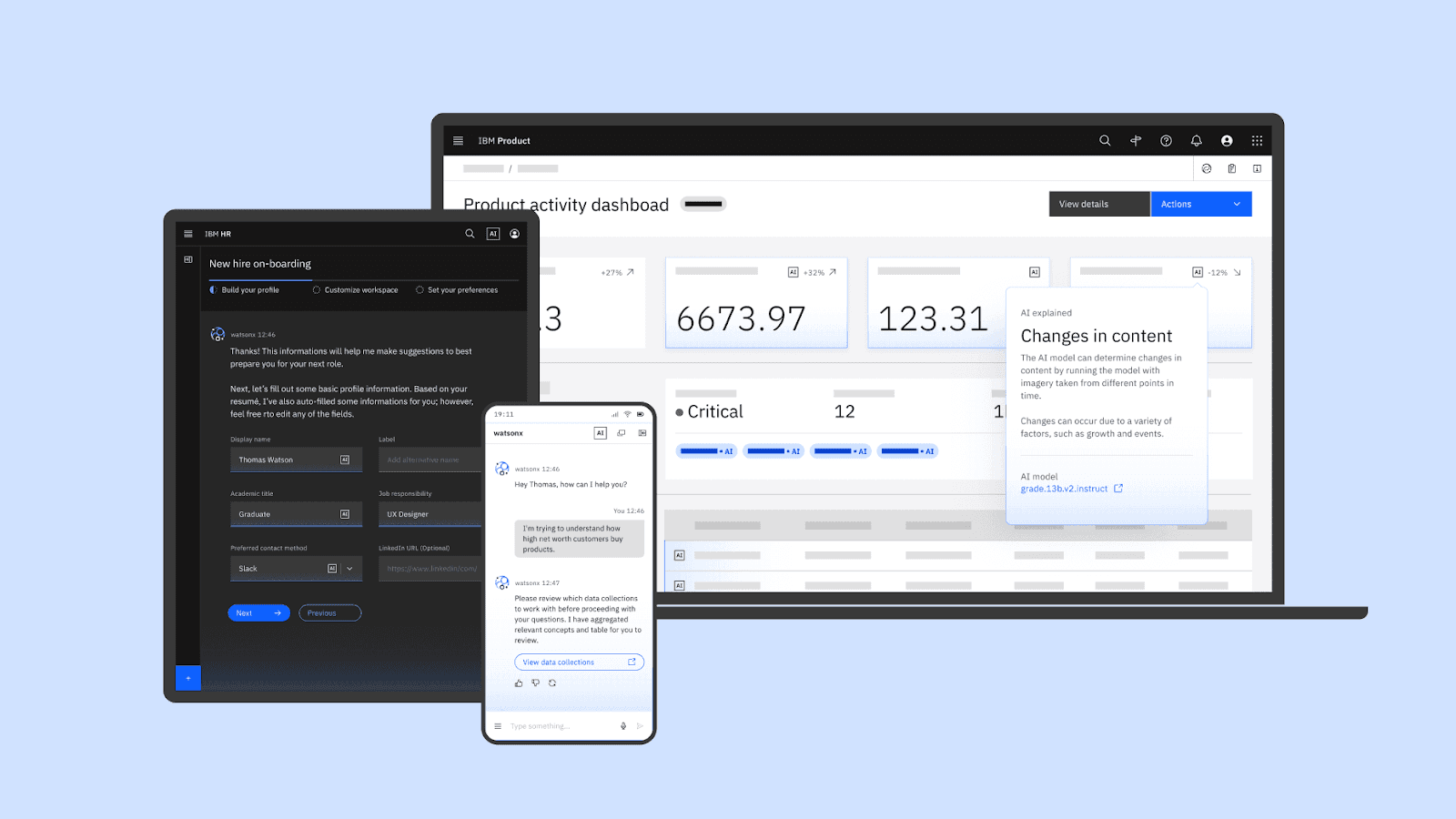
Carbon for AI is an extension of the Carbon Design System, created to give AI-generated content in IBM products a visually distinct identity while ensuring transparency and trust. The framework not only helps users recognize when AI is involved but also integrates explainability into workflows to clarify how decisions are made. By emphasizing consistency and accessibility, Carbon for AI enables seamless interaction with AI across IBM’s product ecosystem.
Key AI Guidelines:
Transparency & Trust:
- Use dedicated AI labels to mark AI-generated content
- Apply consistent light effects and gradients that signal AI involvement
- Provide clear access to explainability features
Progressive Explainability:
- Start with summarized explanations in popovers
- Offer deeper insights through progressive disclosure
- Layer information from "What" to "Why" to "How"
Consistency Across Touchpoints:
- Standardize AI visual styling across all IBM products
- Create recognition patterns that build user confidence
- Maintain accessibility in all AI interface elements
Implementing AI Guidelines in Your System: Supernova's collaborative documentation platform lets you document AI-specific components, patterns, and usage guidelines in the same place as your core design system. Teams can add interactive examples, code snippets, and decision trees that guide developers through AI implementation.
When prototyping AI features with Supernova's AI-powered platform, you can build AI components that follow Carbon's transparency principles—complete with AI labels, progressive disclosure patterns, and consistent visual treatments—all generated from your existing design system.
2. Emplifi Soul Design System: Eight AI Interaction Patterns
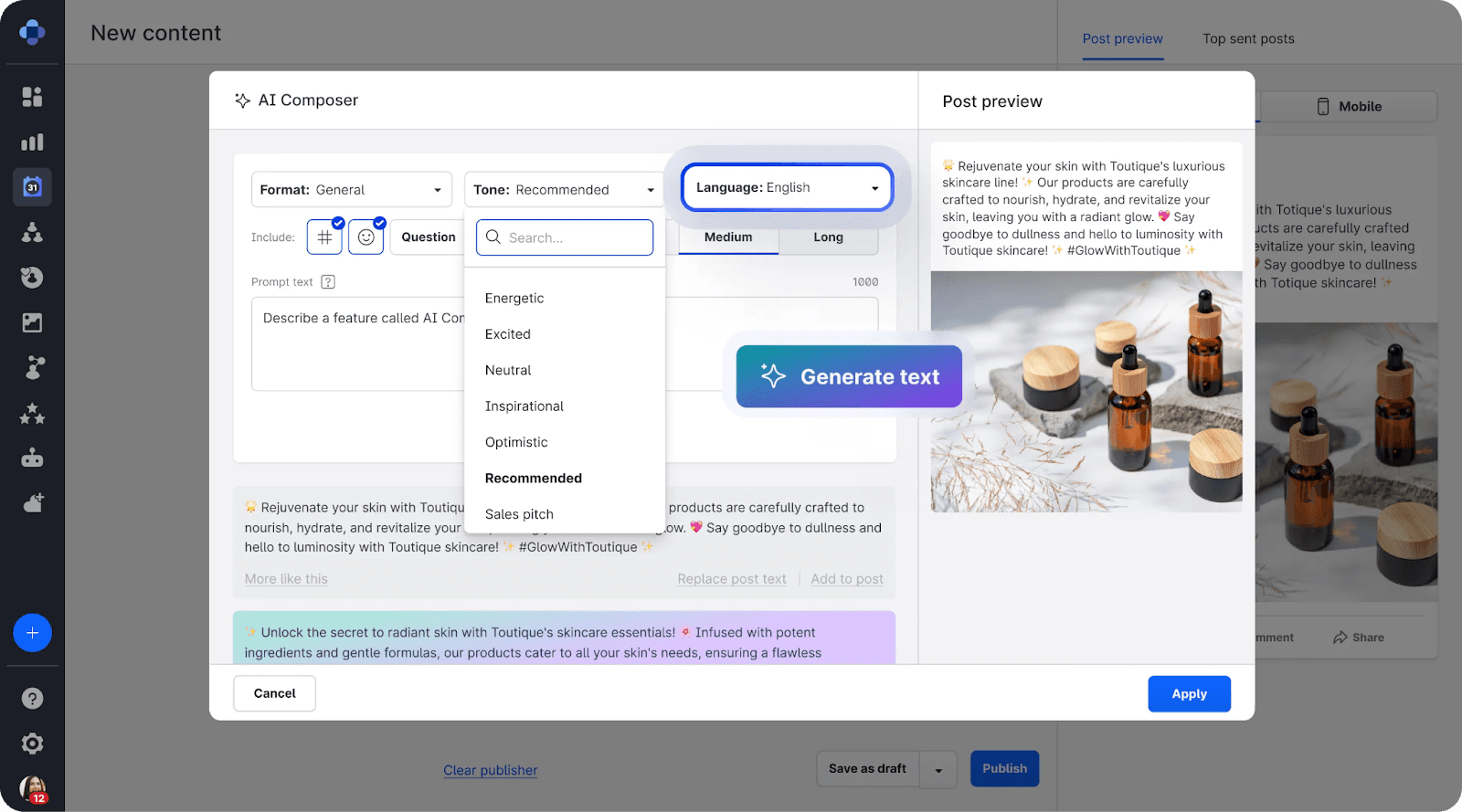
Emplifi’s Soul Design System focuses on creating AI-driven applications that enhance workflows and deliver value through intuitive and seamless user experiences. The system documents eight interaction patterns that guide how AI can integrate into user workflows to provide tailored assistance.
The Eight AI Interaction Patterns:
1. User-Initiated AI Actions
- Users activate AI functions explicitly
- AI provides output based on custom or automatic input
- Examples: AI writing assistants, content generation
2. Contextual AI Assistance
- AI offers recommendations based on current context
- Suggestions appear at relevant moments in workflows
- Examples: Smart replies, auto-complete
3. Predictive Insights
- AI analyzes data to forecast outcomes
- Proactive notifications of important patterns
- Examples: Trend predictions, anomaly detection
4. Conversational Interfaces
- Natural language interactions with AI
- Back-and-forth dialogue for complex tasks
- Examples: Chatbots, voice assistants
5. AI-Enhanced Search
- Semantic search understanding intent
- AI-powered result ranking and filtering
- Examples: Intelligent content discovery
6. Automated Workflows
- AI completes routine tasks automatically
- Background processing without user intervention
- Examples: Auto-categorization, smart scheduling
7. AI-Augmented Decision Making
- AI provides data synthesis for decisions
- Human maintains final decision authority
- Examples: Recommendation engines with explanations
8. Collaborative AI
- AI works alongside humans on creative tasks
- Iterative refinement of AI outputs
- Examples: Design tools, code assistants
Best Practices from Emplifi:
- Match patterns to user goals: Choose interaction models based on what users are trying to accomplish
- Provide context-appropriate assistance: AI should understand where users are in their workflow
- Enable user control: Users should be able to accept, modify, or dismiss AI suggestions
3. SAP Fiori Design System: Explainable AI for Enterprise
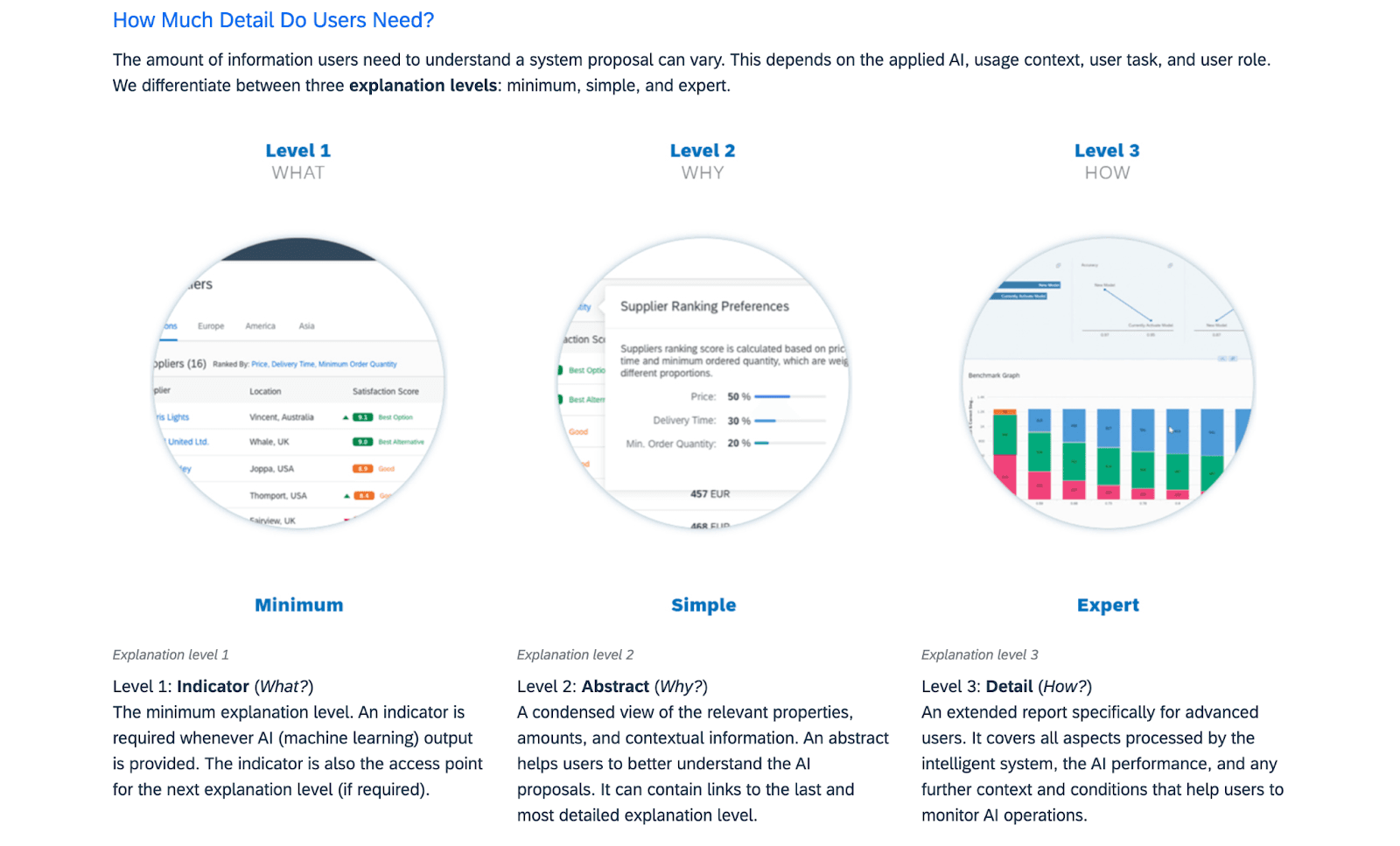
SAP Fiori Design System emphasizes "Explainable AI" to foster trust and transparency in business-critical applications. By providing users with context-specific insights into AI decisions, SAP ensures that users feel confident and in control of their interactions with intelligent systems. This approach is particularly important in scenarios with high complexity, volatility, or regulatory requirements, where understanding AI-driven outcomes is essential.
Explainability Framework:
Three Layers of Explanation:
- What: The AI decision or recommendation (surface level)
- Why: The reasoning behind the decision (intermediate)
- How: The technical process and data used (deep level)
Role-Based Explanations:
- Simplified explanations for general users
- Technical details for data scientists and auditors
- Regulatory-compliant audit trails for compliance teams
High-Stakes Scenarios:
- Detailed traceability for audit requirements
- Clear accountability chains for AI decisions
- Regulatory compliance documentation built-in
SAP's AI Design Principles:
Progressive Disclosure:
- Start with minimal information
- Allow users to drill deeper as needed
- Don't overwhelm users with technical details upfront
Context-Aware Explanations:
- Explanations match the importance of the decision
- High-stakes decisions provide more detail automatically
- Users can always access full explanations if desired
Traceable AI Actions:
- Clear history of AI recommendations
- Ability to review past decisions
- Support for regulatory audits
Documentation for Complex AI Features: Supernova's Ask AI feature allows team members to query your design system documentation in natural language. When documenting complex explainability patterns like SAP's, teams can ask "How do we implement progressive disclosure for AI?" and get instant answers from your documented guidelines.
4. PatternFly AI Guidelines: Human-Centered AI Design
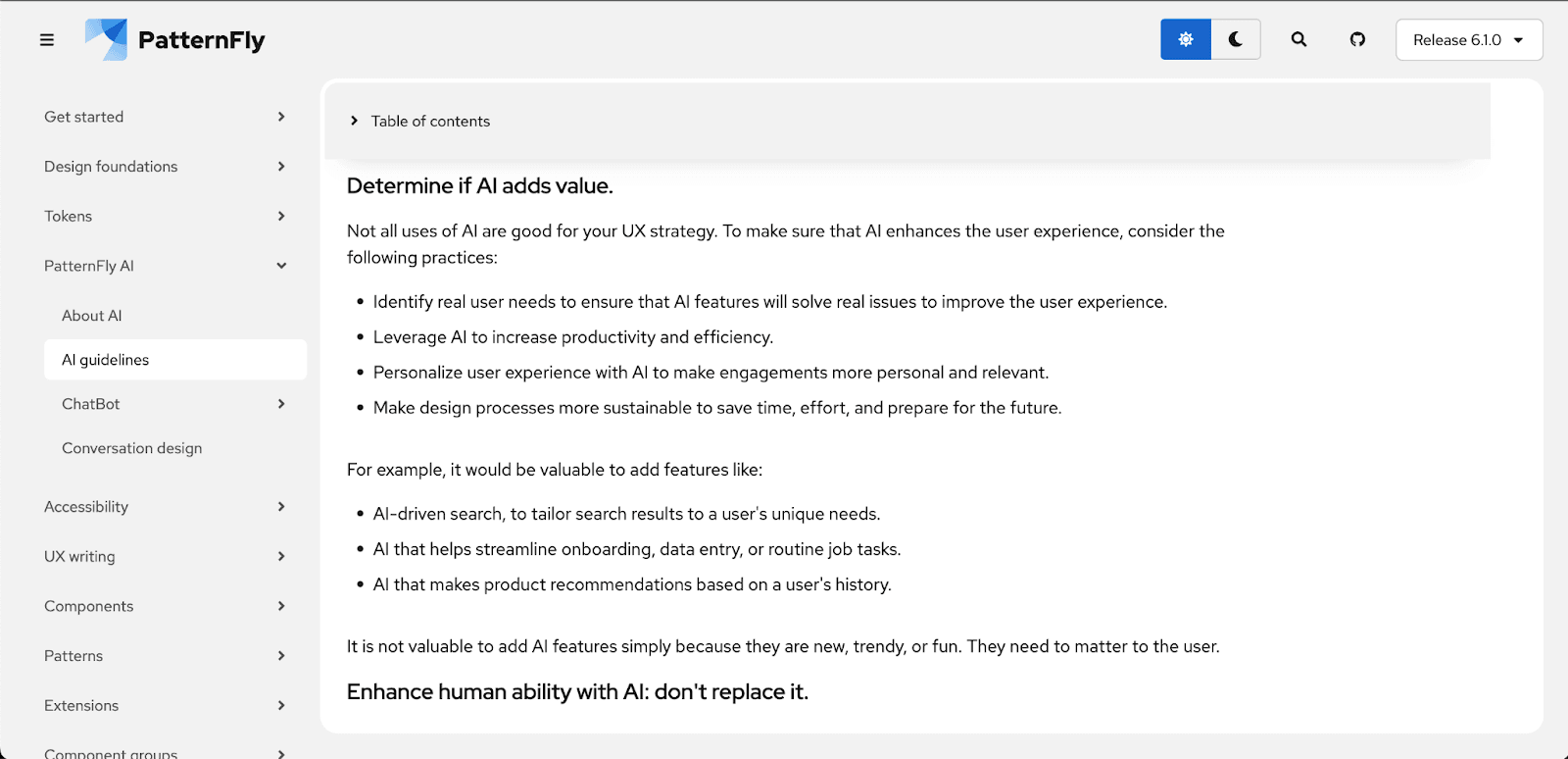
PatternFly focuses on making AI interactions intuitive, explainable, and accessible. Its guidelines prioritize user awareness, ensuring that AI components are clearly identified within the interface. This transparency allows users to engage confidently with AI, supported by tools that simplify complex AI processes.
Core AI Design Principles:
1. Solve Real User Problems
- AI should address genuine needs, not showcase technology
- Improve efficiency and personalize experiences
- Avoid adding AI features solely for competitive reasons
2. Augment Human Abilities
- AI enhances what humans can do
- Never fully replace human judgment
- Support collaboration between humans and AI
3. Build Trust Through Transparency
- Clearly identify when AI is being used
- Explain limitations honestly
- Provide paths to human support when needed
4. Mitigate Bias Proactively
- Test with diverse user groups
- Monitor for discriminatory outcomes
- Build inclusive AI from the start
5. Verify AI Outputs
- Include human review steps for critical actions
- Provide confidence scores when appropriate
- Allow users to report incorrect AI behavior
Implementation Guidelines:
Visual Identification:
- Clear badges or labels for AI-generated content
- Consistent iconography across AI features
- Distinct styling that doesn't overpower the interface
Error Handling:
- Graceful degradation when AI fails
- Clear error messages explaining what went wrong
- Easy access to alternative non-AI workflows
User Control:
- Options to disable or limit AI features
- Ability to provide feedback on AI quality
- Settings to customize AI behavior
5. ServiceNow Horizon: AI in Enterprise Workflows
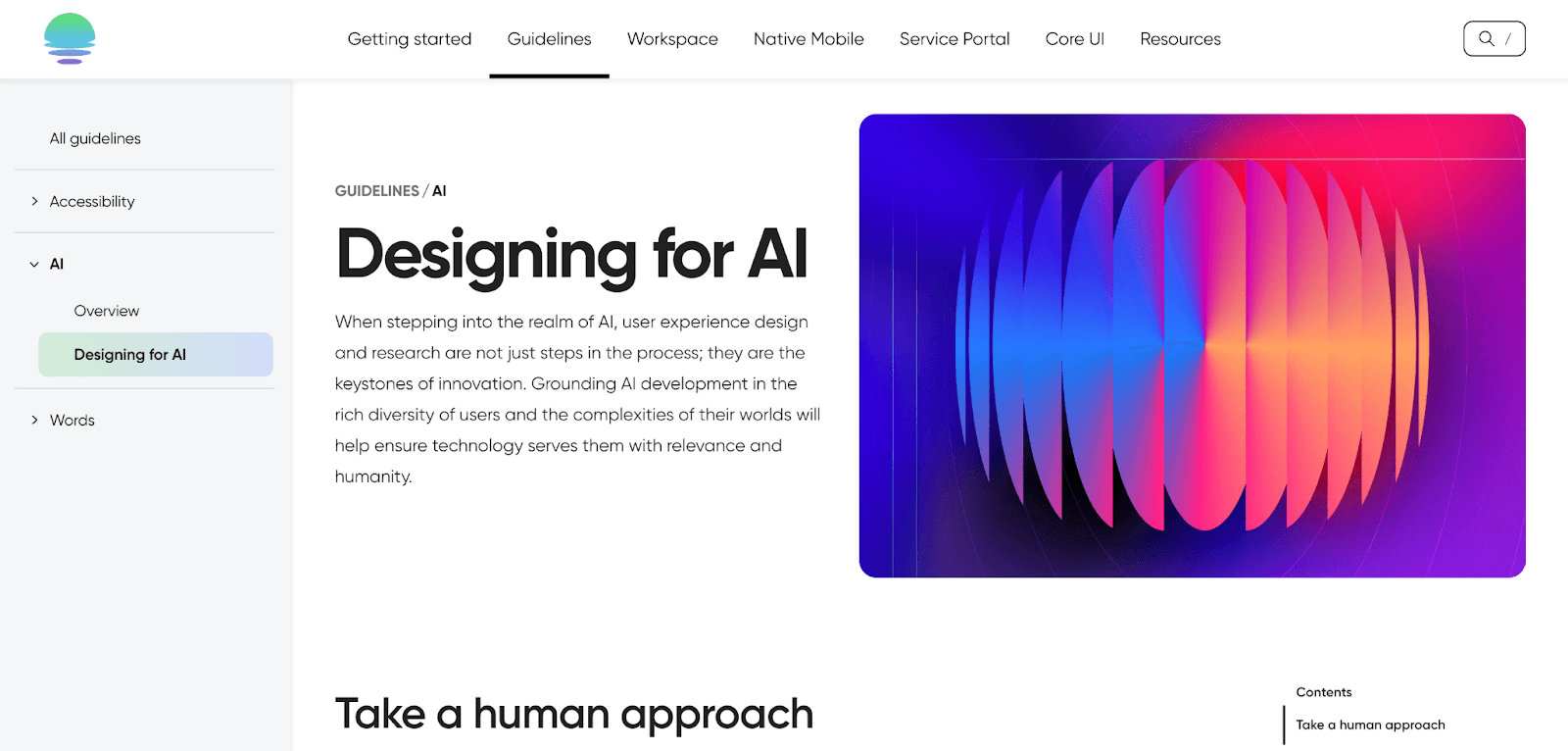
ServiceNow Horizon addresses the integration of AI within enterprise workflows, emphasizing seamless usability and control. By providing clear routes to understanding AI processes, the system fosters confidence in its applications. ServiceNow’s guidelines also emphasize designing for transparency, ensuring users can engage with AI in a way that feels natural and intuitive.
Best Practices for Enterprise AI:
Change Management:
- Introduce AI features gradually
- Provide training and documentation
- Monitor adoption and address concerns
Trust Building:
- Show AI accuracy metrics when appropriate
- Allow users to verify AI recommendations
- Provide clear paths to escalate to humans
Performance Monitoring:
- Track AI feature usage and satisfaction
- Measure impact on workflow efficiency
- Continuously improve based on feedback
6. Microsoft HAX Toolkit: 18 Evidence-Based Guidelines
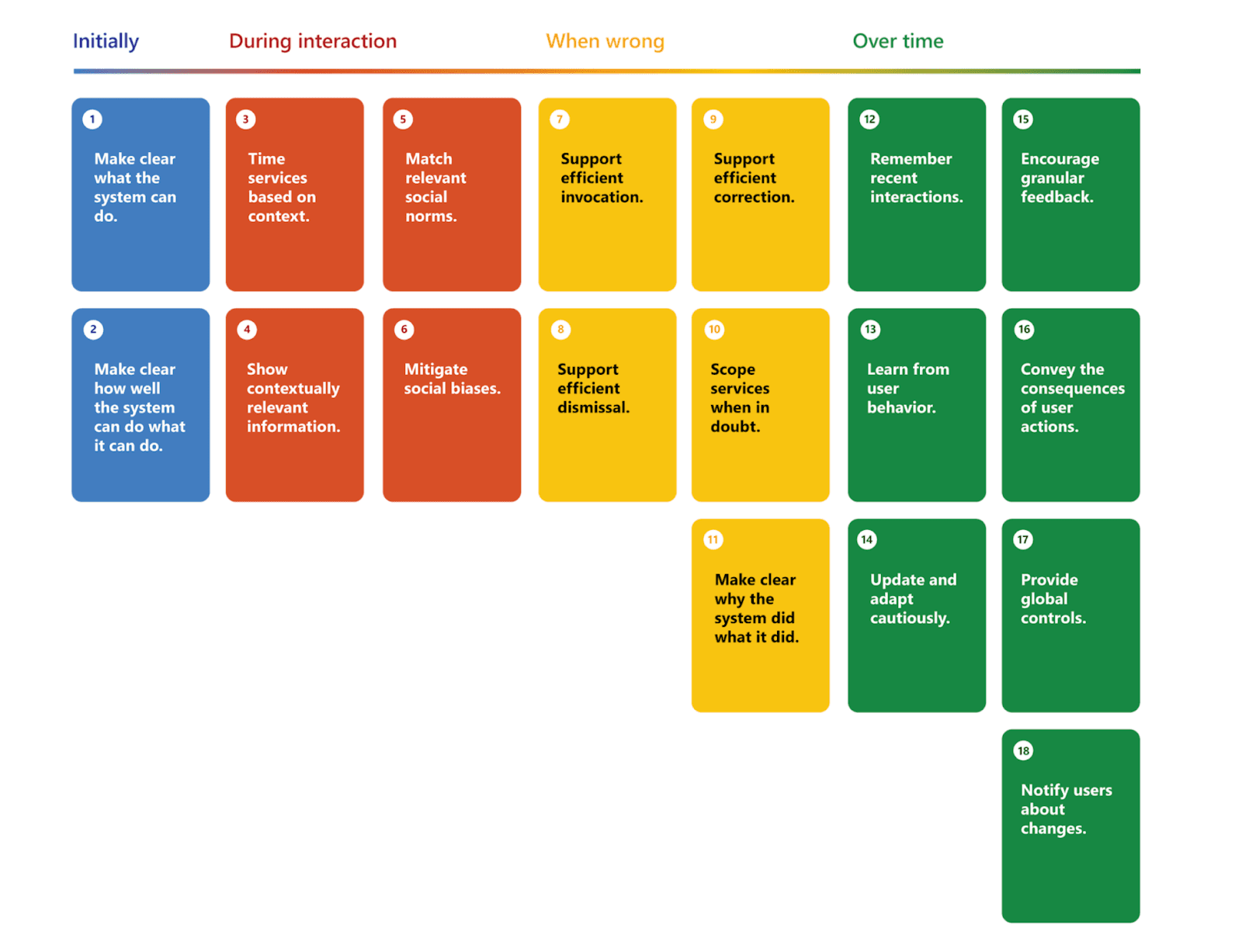
The Microsoft HAX Toolkit offers 18 evidence-based guidelines to design user-centric AI experiences. These guidelines provide structured advice for every stage of interaction with AI, from initial use to ongoing engagement, focusing on transparency, adaptability, and trust-building.
The 18 HAX AI Guidelines (Highlights):
Initial Experience (Guidelines 1-6):
- Make clear what the system can do
- Make clear how well the system can do what it can do
- Time services based on context
- Show contextually relevant information
- Match relevant social norms
- Mitigate social biases
**During Interaction (Guidelines 7-12):**7. Support efficient invocation8. Support efficient dismissal9. Support efficient correction10. Scope services when in doubt11. Make clear why the system did what it did12. Remember recent interactions
**Over Time (Guidelines 13-18):**13. Learn from user behavior14. Update and adapt cautiously15. Encourage granular feedback16. Convey the consequences of user actions17. Provide global controls18. Notify users about changes
Building Your Own AI Design Guidelines: A Practical Framework
Based on the patterns from these six design systems, here's a framework for creating AI guidelines in your organization:
Step 1: Establish Core AI Principles
Define your foundational beliefs about AI in products:
- Transparency (Will you always disclose AI usage?)
- Human control (Can users disable or override AI?)
- Explainability (How much detail will you provide?)
- Error handling (What happens when AI fails?)
- Bias mitigation (How will you address fairness?)
Step 2: Document AI Interaction Patterns
Catalog the ways AI appears in your products:
- Generative AI (content creation, suggestions)
- Predictive AI (forecasts, recommendations)
- Conversational AI (chatbots, voice)
- Automated AI (background processing)
- Augmentative AI (enhancing human work)
For each pattern, document:
- When to use it
- Visual treatment
- User control options
- Error states
- Accessibility requirements
Step 3: Create Visual Language for AI
Establish consistent visual indicators:
- AI badges or labels
- Loading states for AI processing
- Confidence indicators (when appropriate)
- Explainability UI components
- Error state designs
Step 4: Define Explainability Standards
Based on your use cases, determine:
- What level of explanation is required
- How to structure explanations (What/Why/How)
- Role-based explanation depths
- Audit trail requirements
Step 5: Address Accessibility and Inclusion
Ensure AI features work for everyone:
- Screen reader support for AI labels
- Alternative workflows when AI fails
- Testing with diverse user groups
- Bias detection and mitigation processes
Step 6: Document Implementation Guidance
Provide practical guidance for teams:
- Code examples for AI components
- Design files with AI patterns
- Decision trees for choosing patterns
- Checklists for AI feature launches
Start Building Your AI Guidelines: Use Supernova's documentation platform to organize your AI guidelines with the same structure you use for regular components. The flexible editor supports complex hierarchies, code examples, and interactive prototypes—everything needed for comprehensive AI documentation.
Start Building Better AI Experiences
AI is transforming product development, but great AI experiences don't happen by accident. They require thoughtful guidelines, consistent implementation, and platforms that make it easy to do the right thing.
Whether you're documenting your first AI pattern or scaling AI across an enterprise, the combination of clear guidelines and modern tooling ensures your AI features are trustworthy, consistent, and genuinely useful.
Ready to streamline your AI design system?
Request a Demo to see how Supernova helps teams document AI guidelines, prototype AI features with real design system components, and generate production-ready code that follows your standards.
Related Resources
Give your agents a system worth following
See how Supernova documents, syncs, and serves your system in one place.